
A command channel nobody on the internet can reach: Tailscale in a container in front of a private ntfy
Why my ChatOps commands go through a second, private ntfy with no public port, published to my tailnet only by a Tailscale container with Funnel switched off, and how the setup script gets there without me typing a hostname.
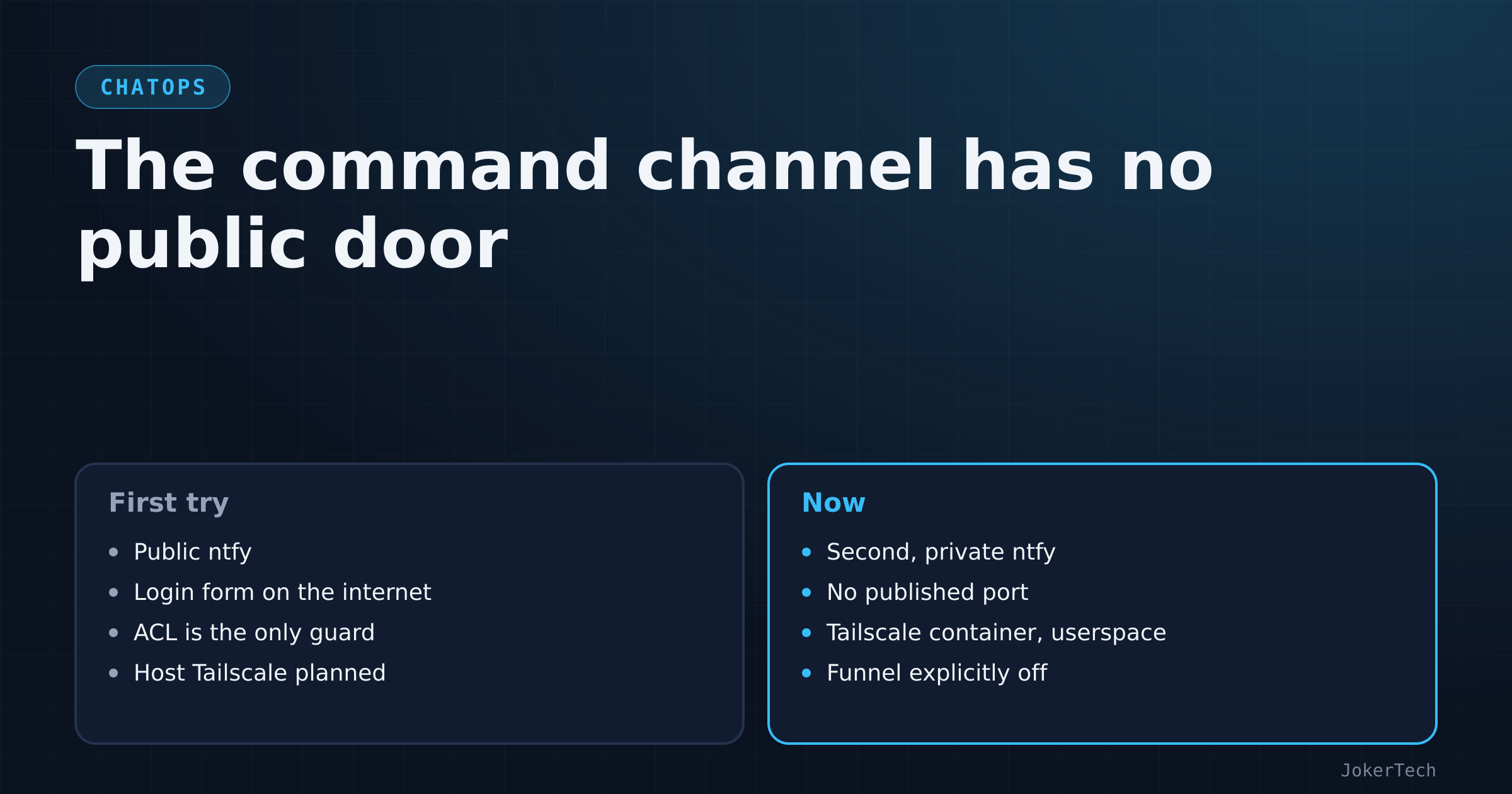
For its first few hours, my ChatOps listener read its commands from my public ntfy server: the same instance that sits behind the reverse proxy on a public hostname, that Uptime Kuma pushes alerts to, and that a GitHub Action pushes pull-request notices to. The access control was decent. The default was deny-all, only the admin user could write the cmd topic, the listener's own ops user could only read it, and a small script had narrowed the shared bot token so that nothing holding it could publish there:
NTFY_AUTH_ACCESS='bot:uptime:wo,bot:books:wo,bot:nocobase:wo,ops:cmd:ro,ops:reply:wo'On paper, fine. What bothered me was simple. The way in to "run things on my server" was a login form on the internet. A correct ACL is one config mistake away from an incorrect ACL, and the consequences of that mistake are very different when the payload is reboot instead of "monitor X is down". So the command channel moved somewhere the internet can't see at all, and this post is about how: a second ntfy that has no public door, and a Tailscale container that is the only way to reach it.
Why not just harden the public one
I went through the options I had on hand before settling.
Keep the public ntfy and trust the ACL. That's the version I had. It works, and it means the command endpoint shares fate with everything else on that server: its exposure, its reverse proxy, its update schedule. The public ntfy also sits behind Cloudflare, which I'd just watched challenge legitimate requests from GitHub's runners with a "Just a moment..." page. A command channel that Cloudflare might decide to challenge is not one I want to rely on from a phone.
Put Authelia in front of it. I run Authelia for apps that have no login of their own. But its README in my repo has a line I wrote on purpose, listing what it's not suitable for: anything a phone app or a git client talks to, and ntfy is named explicitly. The ntfy phone app speaks HTTP to the server with basic auth or a token; it can't complete a browser-based SSO flow. So that's out.
A VPN. This is what I picked, in the form of Tailscale, because I already had a Tailscale account, the phone app is a toggle, and it gives me HTTPS with real certificates on a private name without me running a CA. The remaining question was where Tailscale should run, and that question took two attempts.
Two ntfy instances, on purpose
The public ntfy stays exactly as it was. It carries alerts: monitors going down, NocoBase due-items at eight in the morning, pull-request pushes. Those are things other services need to reach, so it has to be public.
ChatOps got its own ntfy, ntfy_private, living in the ChatOps compose project. Its job description is short: no published port, no reverse-proxy labels, not on the shared frontend Docker network that Traefik watches. Here's the service, with comments added:
  ntfy:
    image: binwiederhier/ntfy:latest
    container_name: ntfy_private
    command: serve
    restart: unless-stopped
    user: "5000:5000"                                  # same unprivileged uid as my other data containers
    environment:
      - NTFY_BASE_URL=${CHATOPS_BASE_URL:?}            # the tailnet HTTPS name, filled in by the setup script
      - NTFY_UPSTREAM_BASE_URL=${CHATOPS_UPSTREAM:-https://ntfy.sh}   # iOS wake-ups only, see below
      - NTFY_BEHIND_PROXY=true                         # Tailscale terminates TLS in front of it
      - NTFY_CACHE_FILE=/var/lib/ntfy/cache.db
      - NTFY_CACHE_DURATION=24h                        # commands older than a day are gone anyway
      - NTFY_AUTH_FILE=/var/lib/ntfy/auth.db
      - NTFY_AUTH_DEFAULT_ACCESS=deny-all
      - NTFY_ENABLE_LOGIN=true
      - NTFY_AUTH_USERS=${NTFY_AUTH_USERS:?}           # admin (me) and ops (the listener), bcrypt hashes
      - NTFY_AUTH_ACCESS=${NTFY_AUTH_ACCESS:?}
      - NTFY_AUTH_TOKENS=${NTFY_AUTH_TOKENS:?}         # the listener's token
    volumes:
      - ./data:/var/lib/ntfy
    healthcheck:
      test: ["CMD-SHELL", "wget -q --tries=1 http://localhost:80/v1/health -O - | grep -Eo '\"healthy\"\\s*:\\s*true' || exit 1"]
      interval: 60s
      timeout: 10s
      retries: 3
      start_period: 40s
    networks: [chatops]                                # shared only with the Tailscale sidecar and the listener
The :? on the auth variables makes Compose refuse to start the service if they're empty. A private ntfy with no users configured and a typo in the default access would be a bad surprise; this way it simply doesn't start.
Users, ACLs and tokens all come from environment variables in a git-ignored .env, which ntfy applies on every start. There's no ntfy user add step to forget, and rotating everything is "delete the generated files and run setup again". The generated file has this shape (values replaced):
CHATOPS_REPO=/srv/docker
CHATOPS_BASE_URL=https://chatops.<your-tailnet>.ts.net
NTFY_AUTH_USERS='admin:$2a$10$xxxxxxxx:admin,ops:$2a$10$xxxxxxxx:user'
NTFY_AUTH_ACCESS='ops:*:rw'
NTFY_AUTH_TOKENS='ops:<generated-token>:chatops'
Two users: admin, which is me on the phone and has the ntfy admin role, and ops, which is the listener. The listener's ACL started as read-only on cmd and write-only on reply. When I moved to one topic per area used in both directions, it had to become read-write, and since channels can now be added without a deploy, it's a wildcard on this private instance. That trade-off has its own post.
The one line that talks to the outside
NTFY_UPSTREAM_BASE_URL points at the public ntfy.sh, which looks like it defeats the purpose. It's there for iOS. A self-hosted ntfy can't wake the iPhone app directly; Apple's push service only accepts notifications from the official app's backend. With an upstream configured, the private server sends ntfy.sh a poll request containing a message ID and a hash of the topic, never the content, and the phone then fetches the actual message from my server over the tailnet. On an Android-only setup you can set CHATOPS_UPSTREAM= to empty and nothing leaves the box at all. I've left the iOS default in the repo; the comment in the compose file says what to change.
First attempt: Tailscale on the host
The first private version, written that same afternoon and never deployed, kept ntfy as its own small compose file bound to loopback:
    ports:
      - "127.0.0.1:8081:80"
and expected Tailscale to be installed on the host, with its serve feature publishing that port to the tailnet:
curl -fsSL https://tailscale.com/install.sh | sh && sudo tailscale up
tailscale serve --bg --https=8443 localhost:8081
The README diagram for that version shows the shape: phone over the tailnet on port 8443, into tailscale serve, into 127.0.0.1:8081, with the listener as a systemd service next to it. The setup script was tested with stubs, and that test caught one real thing about the script rather than about Tailscale: my fake sudo actually ran chown on the test directory and failed with Operation not permitted, so the stub had to become a no-op before the rest of the flow could be checked. The dry run then printed the expected address, https://<host>.<tailnet>.ts.net:8443.
It would have worked. It also meant installing the Tailscale daemon on the host as a system package, with its own update channel and its own systemd unit, plus the listener as another systemd unit. My rule for this server is that Docker is the only thing installed on the host, and when I read the install steps I said so: install Tailscale using Docker, I'm not installing things the legacy way. So the next version put Tailscale in a container.
Finding out how Tailscale wants to run in Docker
This part was less smooth than it should have been. The first two documentation pages fetched for the details turned out to be an overview without the parameters a page about rotating webhook secrets. Raw links to the files in Tailscale's Docker guide repository returned 404. Listing the repository's examples finally gave real compose files, including one for serving an app:
    environment:
      - "TS_EXTRA_ARGS=--advertise-tags=tag:container --reset"
      - TS_SERVE_CONFIG=/config/mealie.json
      - TS_STATE_DIR=/var/lib/tailscale
      - TS_USERSPACE=false
    devices:
      - /dev/net/tun:/dev/net/tun
    cap_add:
      - net_admin
That's kernel networking mode: a tun device and the NET_ADMIN capability. It's what you want if the container should route traffic for other things. I don't. The sidecar has exactly one job, which is to terminate HTTPS for one name and proxy to one service on the same Docker network. Userspace networking does that with no device and no extra capability.
The sidecar device
Here's what ended up in the ChatOps compose file:
  tailscale:
    image: tailscale/tailscale:latest
    container_name: chatops_tailscale
    hostname: chatops
    restart: unless-stopped
    environment:
      - TS_HOSTNAME=chatops                     # the device name in the admin console and in MagicDNS
      - TS_STATE_DIR=/var/lib/tailscale         # node key and state survive container recreation
      - TS_USERSPACE=true                       # no /dev/net/tun, no NET_ADMIN
      - TS_SERVE_CONFIG=/config/serve.json      # declarative serve, applied on start
      - TS_AUTHKEY=${TS_AUTHKEY:-}              # optional; without it, an interactive login link
    volumes:
      - ./tailscale:/var/lib/tailscale
      - ./serve.json:/config/serve.json:ro
    networks: [chatops]
The container joins my tailnet as its own machine, chatops, separate from the server itself. That has a side effect I like: the command channel has an identity of its own. Removing the chatops device in the Tailscale admin console cuts ChatOps off without touching anything else, and that's one of the "phone lost" steps in the README.
The serve config is the entire routing table:
{
  "TCP": { "443": { "HTTPS": true } },
  "Web": {
    "${TS_CERT_DOMAIN}:443": {
      "Handlers": { "/": { "Proxy": "http://ntfy_private:80" } }
    }
  },
  "AllowFunnel": { "${TS_CERT_DOMAIN}:443": false }
}
Port 443 on the device does HTTPS; every path goes to ntfy_private on port 80 over the shared Docker network. ${TS_CERT_DOMAIN} is substituted at runtime with the device's MagicDNS name. AllowFunnel set to false is the line I care most about. Funnel is the Tailscale feature that exposes a serve endpoint to the public internet, and I want a line in the repo that says, in so many words, this one never is. If someone (me, in a year) wonders whether the command channel could be public, the answer is in the file.
On the phone, the Tailscale app runs on the same account, and the ntfy app adds the private server as "another server": https://chatops.<tailnet>.ts.net, user admin. From outside the tailnet that name leads nowhere useful. To send a command, an attacker needs a device on my tailnet and the ntfy admin password, and for anything destructive also a 6-digit code.
The setup script, and the hostname I never type
I didn't want to create a Tailscale auth key, paste it into a file and remember to revoke it, so TS_AUTHKEY is optional. Without it, the container starts, can't log in, and exposes a one-time login URL in tailscale status --json. The setup script does everything around that:
ADMIN_PW=$(rand 'A-Za-z0-9' 28); OPS_PW=$(rand 'A-Za-z0-9' 40); TOKEN="<prefix>$(rand 'a-z0-9' 29)"
TOTP=$(head -c 20 /dev/urandom | base32 | tr -d '=\n')
AH=$(hash "$ADMIN_PW"); OH=$(hash "$OPS_PW")
case "$AH$OH" in *'$2'*'$2'*) ;; *) echo "could not generate bcrypt hashes (is docker usable?)"; exit 1;; esac
umask 077
mkdir -p data state tailscale
The passwords are random strings, and the bcrypt hashes ntfy needs come from ntfy itself: hash() pipes the password twice into docker run --rm -i binwiederhier/ntfy user hash, so there's no host tool involved. The case line checks that both outputs look like bcrypt before anything is written. umask 077 makes the generated .env and chatops.env readable by root only. Then it writes both files, sets the ntfy data folder to uid 5000, and starts the stack with docker compose up -d --build.
Then it waits for Tailscale, printing the login link whenever a new one appears:
for _ in $(seq 1 180); do
  J=$(docker exec chatops_tailscale tailscale status --json 2>/dev/null || true)
  if printf '%s' "$J" | grep -q '"BackendState": *"Running"'; then break; fi
  URL=$(printf '%s' "$J" | sed -n 's/.*"AuthURL": *"\(https[^"]*\)".*/\1/p' | head -1)
  if [ -n "$URL" ] && [ "$URL" != "$shown" ]; then echo "   -> $URL"; shown="$URL"; fi
  sleep 5
done
180 rounds of five seconds, fifteen minutes in total. Once the backend state is Running, the script reads the device's DNSName, checks it ends in .ts.net (if not, MagicDNS or HTTPS certificates are off in the admin console, and the error message says how to fix it), writes the real name into CHATOPS_BASE_URL, and runs docker compose up -d again.
That second up is a chicken-and-egg workaround. ntfy wants its base URL at start, and the real tailnet name only exists after the login. So the first start uses a placeholder, https://chatops.pending.ts.net, and the second start corrects it. It's not elegant, but it means the script never asks me to type a hostname, which is the step I'd most likely get wrong.
At the end, the script prints the admin password and the TOTP secret once, with an instruction to save both in my password manager, and three next steps: disable key expiry, set up the phone, test in dry-run first.
Doing it for real
When I sat down to do it, the Tailscale admin console confused me for a moment. The Machines page was empty and offered an "Add first device" button, and I wasn't sure how to proceed after signing in. You don't need that button. The order that works:
- Under DNS in the admin console, turn on MagicDNS and HTTPS certificates.
- Install the Tailscale app on the phone, same account, and connect it.
- On the server, run the setup script from the ops folder.
- Open the login link it prints, approve the new
chatopsdevice. - In the ntfy app, add the private server and subscribe to the channel topics.
The listener answered from the phone after that, which is the end-to-end proof that the Tailscale sidecar, the serve config and the private ntfy all work. Its first answer was an error about an API key, but that's a story about env_file, not about networking.
Two things that aren't in any file
Tailscale node keys expire, by default after 180 days. For a phone that's fine; you log in again. For a headless device whose only purpose is to be reachable, an expiry means that one day, months from now, ChatOps silently stops answering. So: Machines, chatops, the menu, Disable key expiry. I put that in a housekeeping item in NocoBase because I knew I'd forget, and the setup script prints it as step one.
The other one surprised me. Enabling HTTPS certificates means the devices get real certificates from a public CA, and public certificates are logged in Certificate Transparency logs. So chatops.<tailnet-name>.ts.net is visible to anyone who searches those logs. The name tells them nothing they can use without being on the tailnet, and the tailnet name is random, but it isn't secret, and I prefer knowing that up front.
What this buys, and what it moves
It's worth being precise about what changed in the threat model, because "it's on a VPN" can make people stop thinking.
Before, an attacker needed the ntfy admin password, and the endpoint was anywhere on the internet. Now they need a device on my tailnet and the ntfy admin password; for destructive commands also a code. The first requirement is where all the value is: no scanner, no credential-stuffing bot and no ntfy vulnerability is reachable from the internet, because there is nothing listening there.
What it moves is trust. My Tailscale account is now part of the server's perimeter. Whoever controls that account can add a device to the tailnet, and from there the private ntfy is one password away. The README says to treat the ntfy admin password, the ChatOps TOTP secret and the Tailscale account as server keys, and when I set this up one of the housekeeping reminders I created in NocoBase was to enable two-factor authentication on the Tailscale and GitHub accounts. GitHub matters too, because the listener runs git pull on whatever is on the main branch.
It also moves availability. The command channel now depends on Tailscale working on both ends, on top of ntfy and the listener. When any of that fails, my fallback is SSH, which still exists; ChatOps never replaced it, it only made me need it less.
Day to day
From the phone's point of view, ChatOps is fourteen topics on a second server in the ntfy app. I mute the ones that don't need to buzz. The Tailscale app has to be connected, which on my phone it nearly always is.
The failure mode I've noticed is quiet: if the Tailscale app has disconnected, the private subscriptions just show nothing new, no error. My habit is now to glance at the Tailscale toggle when a command seems to vanish. It's the price of the design, and I'd pay it again.
Without the phone, any device on the tailnet can talk to it with curl: post the command as the body to https://chatops.<tailnet>.ts.net/<topic> with the admin credentials, and poll the same topic's JSON stream for the reply, which carries the tag chatops. That's documented in the README as the last test step and it's also my fallback if the phone app misbehaves.
What it costs, and what I'd change
The maintenance is small but not zero. Both images are on latest. The ChatOps stack is deliberately excluded from ChatOps itself, so updating Tailscale or the private ntfy is an SSH job in the ops folder, and a surprise breaking change in either image would take the channel down precisely when I'm trying to use it from a phone. If I were starting over, I'd pin both from day one and let Renovate propose bumps, the way I treat the stateful apps.
The setup script polls JSON with grep and sed because I didn't want jq on the host. That's brittle against a change in Tailscale's status output, and I know it. It runs once per install, so I've let it be.
And I'd test the iOS upstream path deliberately. It's on by default, it's the only traffic that leaves the box, and I've only reasoned about what it sends from the ntfy documentation and comments rather than watched it on the wire.