
The API I Didn't Use, and Why: WebView vs Impersonating the Android App
Two ways to talk to Google Photos' private API: forge the Android app's own requests with a master token, or embed a real browser and let the page make the calls. Only one of them is a credential you'd want on a phone.
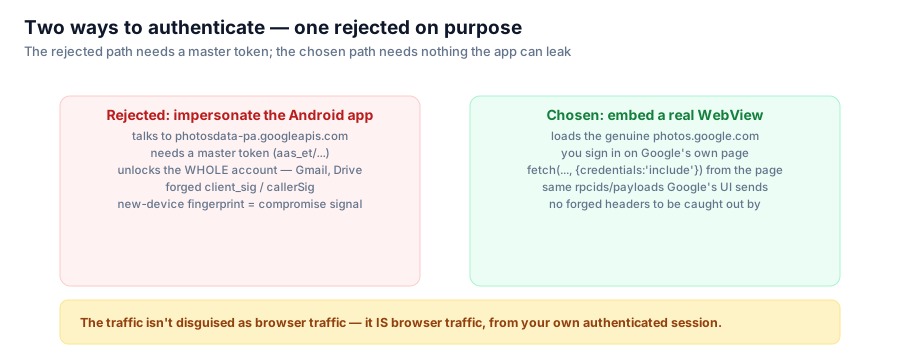
Once you've decided to drive Google Photos' private API instead of the crippled public one, there are two ways to authenticate against it. I deliberately rejected the one that would have made the app look more native, because it requires storing a far more dangerous credential.

The rejected path needs a credential that unlocks the whole Google account. The chosen path needs nothing the app itself has to hold.
Option A: impersonate the Android app
Google Photos' actual Android client talks to a different backend — photosdata-pa.googleapis.com — using a mobile protobuf protocol rather than the web's batchexecute. A third-party client could, in principle, forge those same requests: matching protobuf shapes, a client_sig/callerSig pair, and the authentication token the mobile app uses.
That token is not a scoped OAuth token. It's a master token (aas_et/…) — the credential that authenticates as the account holder across essentially all of Google, not just Photos. Gmail, Drive, everything. Getting one at all requires extracting it from a device or emulating the official app's login flow closely enough to be issued one.
Storing that on a phone, for an app whose whole job is "delete some photos," is a wildly disproportionate blast radius. If the app's storage were ever compromised, the attacker wouldn't get "can delete photos" — they'd get "can act as this Google account, full stop." And a master token showing up on a device Google doesn't recognize as the real Photos app is close to a textbook account-compromise signal from Google's own fraud-detection point of view — the opposite of the "look like a person browsing" property you actually want.
I evaluated this path (via the xob0t/gpmc project, credited later in this series) and deliberately did not build on it.
Option B: embed a real browser and let it authenticate
The alternative — the one the app ships — is an Android WebView loading the genuine photos.google.com. There is no login form anywhere in the app; you sign in on Google's actual page, inside a real Chromium engine (WebView on modern Android is Chromium), with whatever 2FA or passkey flow Google presents you. The app never sees your password.
Every Google API call the app cares about is then issued from inside that page, by the page's own JavaScript:
fetch(batchExecuteUrl, {
  method: 'POST',
  credentials: 'include',
})
credentials: 'include' means the browser attaches the session cookie automatically, the same way it would for any tab you had open to Photos yourself. The app injects a bridge script and asks the page to perform named operations, receiving parsed JSON results back — but it never touches, reads, or stores the underlying session cookie for this purpose. (There's exactly one narrow exception to that, covered in the next post.)
The property that actually matters
This isn't just "more secure" in the abstract — it's a difference in what the traffic is. Requests issued by Option A are Photo Cleaner pretending to be the Android app: forged headers, a guessed signature scheme, traffic that looks native but isn't. Requests issued by Option B are not disguised as anything, because they're not a forgery — they're genuine photos.google.com web traffic, from your own authenticated tab, with the same rpcids and payloads Google's own front-end sends on your behalf.
There's no header-matching arms race to lose, because there's nothing forged to get caught. The cost is that the app is now shipping a WebView rather than a slim native network client — with its own failure modes, like renderer process death, which is the subject of a later post. That's a real maintenance cost. I'd take it again over holding a master token on a user's phone.
Series: Google Photos Cleaner.