
Keeping Secrets in a Private Git Repo Without Actually Leaking Them
secrets/db.enc.env is committed to a private GitHub repo, key names visible, values encrypted — and two independent age keys, one per machine, mean neither one alone has to be shared with the other.
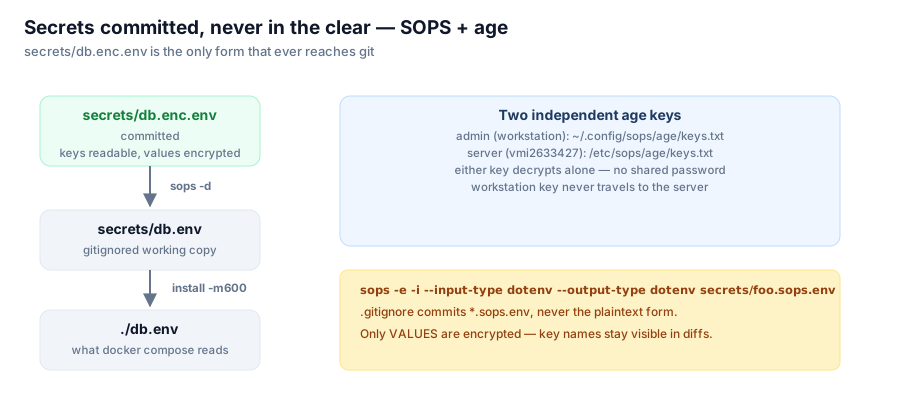
nextcloud-selfhosted replaced a previous setup that tracked nextcloud_data/config/config.php — dbpassword, secret, and passwordsalt in plaintext, pushed straight to origin/master. That project was private too. Private is not the control that matters here; what matters is that the current repo could go public tomorrow and nothing in it would need to change.

The only form of the secret that ever reaches git is the encrypted one.
What's actually committed
The file structure makes the boundary explicit:
secrets/db.enc.env     committed    values encrypted, keys readable so diffs stay reviewable
secrets/db.env         gitignored   working copy
./db.env               gitignored   what docker compose actually reads
db.env holds MariaDB credentials that docker-compose.yml reads via env_file. The plaintext version never touches the repository at any point in its lifecycle — not committed once and later scrubbed, never committed at all. What lands in git is secrets/db.enc.env, produced by SOPS encrypting only the values: MYSQL_USER stays visible as a key name in every diff, so git log -p on that file tells you which secret changed on a given commit without ever showing you what it changed to.
Two keys, not one shared password
Encryption targets age recipients listed in .sops.yaml:
| Key | Holds |
| admin (workstation) | ~/.config/sops/age/keys.txt |
| server (vmi2633427) | /etc/sops/age/keys.txt |
Each recipient's private key decrypts independently. There's no shared secret distributed between the two machines — the workstation key never travels to the server, and the server key never needs to leave /etc/sops/age/keys.txt. sops resolves whichever key is available via $SOPS_AGE_KEY_FILE, then ~/.config/sops/age/keys.txt, then /etc/sops/age/keys.txt, so the same sops -d command works unmodified on either machine.
The daily commands
Regenerate the decrypted working file after a pull:
./scripts/secrets-decrypt.shChange a secret without plaintext ever touching disk outside an editor buffer:
./scripts/secrets-edit.sh
git commit -am "rotate db password" && git push
Read a single value without writing anything to disk at all:
sops --decrypt --extract '["MYSQL_ROOT_PASSWORD"]' secrets/db.enc.envMoving a private key correctly
The one rule that matters most here: never cat a private key, never paste it into a heredoc (heredoc contents land in shell history), and never send it through a chat assistant. Move it over ssh directly:
ssh root@HOST 'install -D -m600 /dev/stdin /etc/sops/age/keys.txt' < ./the.keyIf a paste is unavoidable, use an interactive editor (sudo nano) rather than a shell redirection, precisely because redirections and heredocs are what end up recoverable in .bash_history months later.
Why this design, specifically
The combination of "encrypted at rest in git" and "two independent decryption keys" solves two different problems at once. Committing ciphertext means the repository's visibility (public or private) stops being the only thing standing between an attacker and the database password — the private repo is a second line of defence, not the first, exactly as the project's own README states it. Two independent keys mean losing one machine — a stolen laptop, a compromised server — doesn't require re-keying the other, and adding a third machine later is additive: generate a key, add the public half to .sops.yaml, re-encrypt, done. Neither property comes from "the repo is private." Both come from what's actually stored in it.
Series: The Self-Hosting Stack. Next: what rotating that age key actually stops — and what it doesn't.